Linux - Best method
Have a computer which is offline (no internet access).
Set the computer to not go to sleep or suspend.
Open terminal and run:
Copy to Clipboard
sudo dmesg -T -w | grep -i usb
Plug in USB devices. Every time you plug in a device it is given a number starting around 1, then 2, 3, etc. If you want to be 100% sure which is which later on, write this down on each device so you can tell which device is which number.
Take a picture or screenshot when you start it so you know when and what the devices looked like.
Wait days/weeks/months to see if anything changes. If so, you may be able to look at the log to figure out what device changed. You are looking for devices which are added. A malicious device will likely appear as a keyboard so that it can type commands.
Windows
1: Download USBDeView
https://www.nirsoft.net/utils/usb_devices_view.html
2: Move the Connect Time and Disconnect Time columns near the front so you can see and sort by them easily.
3: Set the options similar to this (optional, but recommended):
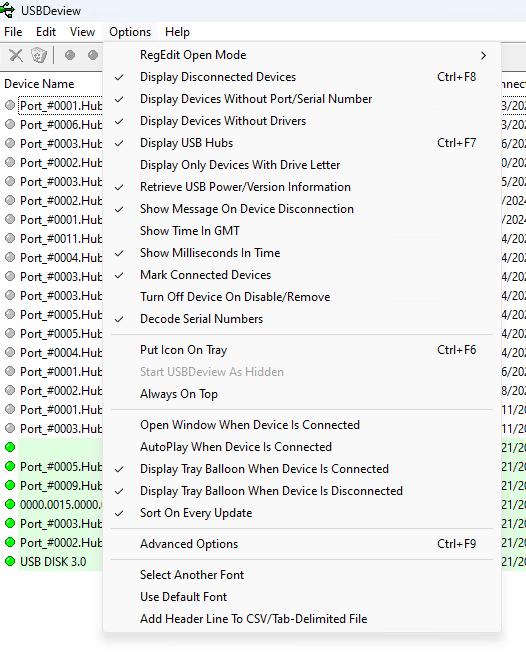
4: Sort by Connect Time column by clicking the column header.
5: Take the computer offline. Disable Wifi adapters, and unplug Ethernet.
6: Ensure the computer is set to NOT go to sleep. If Windows is trying to install updates, install them and reboot so it is fresh.
7: Plug in USB Device(s) you want to test.
8: Take a picture of the screen so you have a reference of what it looks like now.
9: Wait some time (days or weeks) and check to see if any unauthorized devices have shown up in the list, most likely a fake keyboard.